 how-to
How to Teach Coding Without Experience: A 2026 Guide
Table of Contents
- Step 1: Prepare Yourself Before You Teach Coding
- Step 2: Choose Your First Coding Lesson Plans for Teachers
- Step 3: Start With Unplugged Coding Activities for Elementary Students
- Step 4: Introduce Beginner Coding Activities for Students in Class
- Step 5: Pick Coding Tools for Teachers With No Experience
- Step 6: Assess Understanding and Handle Common Classroom Problems
- Conclusion: You Do Not Need to Be a Coder to Teach Coding
- Frequently Asked Questions
Last Updated: October 6, 2026
Step 1: Prepare Yourself Before You Teach Coding
You can teach coding without experience. The subject is less about writing perfect code and more about guiding students through problem-solving, and that is a skill teachers already have. At CodeAlgo Academy, we work with K-8 teachers who have never written a line of code, and they run strong coding lessons every week.
The fear is normal. Many teachers worry they will confuse students or get stuck on a question they cannot answer. But teaching coding does not mean knowing every answer in advance.
Here is the mindset shift that matters most: you are not the expert in the room. You are the guide. Students learn faster when they solve problems themselves, and your job is to keep them moving, not to hand them answers.
What You Actually Need to Know (Less Than You Think)
You need far less technical knowledge than most people assume. A basic grasp of these ideas is enough to start:
- Sequencing - steps run in order, one after another
- Loops - repeating a step instead of writing it again
- Conditionals - "if this happens, then do that"
- Debugging - finding and fixing mistakes
- Variables - a labeled box that holds a value
That is the core of it. You do not need to master a programming language before your first lesson.
Your 30-Minute Pre-Teaching Prep Checklist
Most new teachers skip preparation and then panic mid-lesson. A short, repeatable prep routine fixes that. Do this the day before your first coding lesson:
- Run the activity yourself, start to finish. Open the tool or print the unplugged cards and complete the task as a student would. You will spot confusing steps before your class does.
- Write the one-sentence goal. Example: "Students can use a loop to repeat a step three times." If you cannot state it in one sentence, the lesson is too big.
- Predict three sticking points. Common ones: students forget to save, they mix up order of steps, or they give up when the character does not move. Write a one-line response for each.
- Test the tech on the student device. Log in on the same tablet or laptop students will use. Check that the site loads, the login works, and audio is not blaring.
- Prepare one backup activity. If the internet drops or a device fails, have a paper-based version of the same concept ready.
- Decide how you will check understanding. Pick one quick check: ask two students to explain their steps, or collect one saved project.
- Set your "I don't know" line. Rehearse saying, "Good question - let's find out together." This keeps you calm and models curiosity.
A Simple Mindset Rule for Day One
You will not know every answer. That is fine. The teachers who succeed at teaching coding without experience are the ones who prepare a little, stay curious, and let students do the thinking. Your preparation is not about mastering code - it is about removing surprises so you can focus on guiding the room.
Step 2: Choose Your First Coding Lesson Plans for Teachers
Good coding lesson plans for teachers start with a clear goal, not a tool. Decide what students should be able to do by the end of the lesson, then pick activities that get them there.
A simple lesson plan has four parts:
- Goal - one skill, stated plainly ("students can use a loop")
- Warm-up - a short question or game to spark interest
- Main activity - hands-on practice, not a lecture
- Wrap-up - a quick check that students understood
Keep each lesson short. For younger students, 20 to 30 minutes works well. Older students can handle 45 minutes.
You do not need to write lessons from scratch. Standards-aligned curricula, like the ones built around CSTA and Common Core State Standards, give you a ready structure. That saves hours of planning and keeps your lessons on track.
A Ready-to-Run First Lesson Plan (Sequencing, 30 Minutes)
Here is a complete plan you can teach tomorrow, even if you have never coded. It targets sequencing, the foundation for every other concept.
Goal: Students can put steps in the correct order to complete a task.
Materials: Paper, pencils, and one set of arrow cards per pair (or sticky notes).
Timing and flow:
- 0-3 min - Warm-up. Ask: "What order do you put on shoes and socks?" Let two students answer. Point out that order matters.
- 3-8 min - Mini-demo. Draw a 4x4 grid on the board. Place a star in one square. As a class, write the arrow commands (up, right, right) to reach the star. Do not explain loops yet.
- 8-20 min - Main activity. Pairs draw their own 4x4 grid, hide a star, and write arrow commands for a partner to follow. Partners take turns being the "programmer" and the "robot."
- 20-26 min - Debugging round. Pairs swap grids and find one mistake in the other pair's commands. Ask: "Where did the robot go wrong, and why?"
- 26-30 min - Wrap-up. Ask two students to explain their steps out loud. Collect the grids as your understanding check.
What to watch for: Students who write commands in the wrong order, or who forget that the robot starts at a fixed square. Both are normal and become your teaching moments.
Adapting the Same Plan Across Ages
The plan above scales with small changes, which is what makes it useful for mixed classrooms:
- Grades K-2: Use a 3x3 grid and only two directions. Read commands aloud together.
- Grades 3-5: Use a 4x4 grid and add one obstacle square students must avoid.
- Grades 6-8: Add a rule that any repeated command must be written as a loop, then ask students to rewrite their commands using loops.
- Students who finish early: Ask them to design a harder grid for a classmate.
- Students who need support: Give them a pre-drawn grid with the star already placed and only the first two commands filled in.
How to Reuse This Structure All Year
Once you have run this lesson, you can swap the concept and keep the timing. Replace "sequencing" with "loops," "conditionals," or "variables," and the 30-minute shape stays the same: warm-up, mini-demo, hands-on practice, debugging round, wrap-up. That consistency is what lets a teacher with no coding background run a full unit without rewriting plans each week.
Step 3: Start With Unplugged Coding Activities for Elementary Students
Unplugged coding activities for elementary students teach programming ideas with no computer at all. Students use paper, cards, and their bodies to practice sequencing and logic. This is often the best first step because it removes screen pressure and lets every student join in.
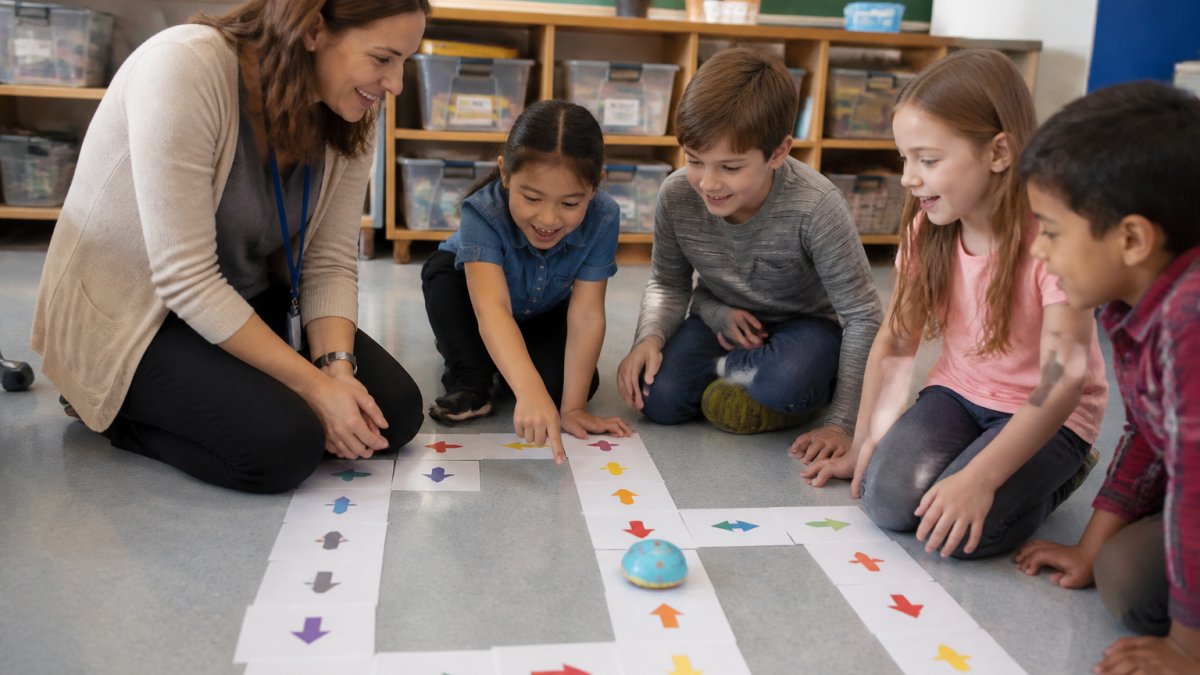
Three Unplugged Activities You Can Run Tomorrow
- Paper maze: Draw a grid. Students write arrow commands to guide a partner from start to finish.
- Human robot: One student gives step-by-step directions; the other follows them exactly. Mistakes become debugging lessons.
- Story sequence: Students order picture cards to retell a story, then explain why the order matters.
Each activity takes 15 to 20 minutes and needs only paper and pencils. No tech knowledge required.
Step 4: Introduce Beginner Coding Activities for Students in Class
Beginner coding activities for students should be small, hands-on, and forgiving. Start with drag-and-drop blocks or simple puzzles where students see results right away.
Try this order:
- Block-based puzzles - students snap blocks together to move a character
- Short challenges - one clear goal, like "make the character reach the star"
- Pair work - two students solve one problem together and explain their thinking
The goal is practice, not perfection. When students get stuck, ask questions instead of giving answers. "What do you think happens next?" moves them forward better than a fix.
Step 5: Pick Coding Tools for Teachers With No Experience
Coding tools for teachers with no experience should do the heavy lifting for you. Look for platforms that guide students step by step and give you clear progress data.
What to Look For in a Platform
- No background needed - the tool teaches the concepts for you
- Standards alignment - lessons map to CSTA and Common Core
- Progress tracking - you can see what each student has learned
- Works on many devices - web, iOS, and Android support helps every classroom
- Healthy screen time - purposeful tasks, not endless games
At CodeAlgo Academy, our platform is built for exactly this. Teachers with no coding background facilitate lessons, while game-based learning keeps students engaged. Our curriculum supports measurable math growth, and students have solved over 41,928 coding problems across 10 states.
| What to Check | Why It Matters | Red Flag |
|---|---|---|
| Teacher setup time | You need to start fast | Hours of training required |
| Progress data | You must prove learning | No reports or scores |
| Device support | Classrooms vary | One device type only |
| Screen-time design | Keeps focus sharp | Pure game, no learning |
Step 6: Assess Understanding and Handle Common Classroom Problems
Assessing understanding does not require a test. Watch how students solve problems, ask them to explain their steps, and check their saved work. If a student can describe why their code works, they understand it.
Common problems and quick fixes:
- Students rush through lessons - ask them to explain each step out loud
- One student dominates pair work - set clear roles and swap them often
- A student gets stuck and gives up - break the problem into smaller parts
- You do not know the answer - say so, then search for the answer together
That last point matters. Showing students how to find answers, read documentation, and ask an online community builds independent learning. It also takes pressure off you.
Conclusion: You Do Not Need to Be a Coder to Teach Coding
Teaching coding without experience comes down to preparation, simple lesson plans, and the right tools. You guide, students explore, and everyone learns together.
If you want a head start, CodeAlgo Academy gives you a standards-aligned, game-based curriculum built for teachers with no coding background. It works on web, iOS, and Android, tracks measurable math growth, and keeps screen time healthy and purposeful. Get started with CodeAlgo Academy and bring coding to your classroom this year.
Frequently Asked Questions
Can you teach coding without knowing how to code?
Yes. You do not need to write code yourself to teach coding. What matters is guiding students through problem-solving, debugging, and logical thinking. Platforms built for schools, such as CodeAlgo Academy, provide lesson plans, adaptive learning paths, and step-by-step activities so teachers can facilitate without a programming background. You learn alongside your students, and that shared discovery often makes lessons more engaging.
How do you introduce programming to complete beginners in K-8?
Start with unplugged coding activities for elementary students: sequencing games with cards, direction-following exercises, and simple pattern tasks. These build the logic behind programming before any screen appears. Once students understand order and steps, move to block-based beginner coding activities for students. Keep sessions short, celebrate mistakes as part of debugging, and let students explain their thinking out loud.
What are the best coding tools for teachers with no experience?
Look for platforms that include ready-made coding lesson plans for teachers, adaptive pacing, and clear progress tracking. CodeAlgo Academy is built for K-8 with no coding background required, aligned to CSTA and Common Core State Standards, and available on web, iOS, and Android. It reports measurable math growth, so you can show administrators concrete results rather than just engagement.
How long does it take to learn enough coding to teach beginners?
You can facilitate a first lesson within a week of preparation. Spend two or three hours learning the specific concepts your students will cover, such as sequences, loops, and conditionals, then practice the exact activities they will do. You do not need to master programming, only stay one step ahead. With structured coding tools for teachers with no experience, the platform carries the technical load while you focus on guiding students.