 How-to
How to Evaluate a STEM Curriculum: A Parent's Checklist
Quick Summary
To evaluate STEM curriculum for your child, check age fit and starting level, confirm the program builds real reasoning rather than just rewarding taps, see a sample lesson in action, and judge whether the screen time is active. A short trial session together will show you whether your child is thinking, persisting and wanting to return.
- Confirm the age range matches your child and that lessons adapt to their level.
- Look for a reasoning loop: your child writes steps, runs them, then fixes what went wrong.
- Ask whether progress reports show specific skills rather than only minutes played.
- Try a free sample lesson and count how many real decisions your child makes.
- Run one ten-minute trial session and ask your child to explain what they figured out.
Table of Contents
- Why Evaluating a STEM Curriculum Matters for Your Child
- Step 1: Check Age Fit and Starting Level
- Step 2: Confirm the Program Builds Real Learning, Not Just Fun
- Step 3: Look at STEM Curriculum Examples in Action
- Step 4: Judge the Screen Time and Engagement
- A Practical STEM Curriculum Evaluation Checklist
- How to Evaluate a Curriculum Before You Commit
- Start Your Child's First Week with CodeAlgo Academy
- Frequently Asked Questions
Why Evaluating a STEM Curriculum Matters for Your Child
Learning to evaluate STEM curriculum is one of the more useful decisions a parent can make this year. Your child is likely spending real time on screens anyway, so the question is whether that time builds thinking skills or just keeps them busy. A good program helps kids solve problems, ask questions and try again after a mistake. A weak one looks educational but rewards clicking through without thinking.
Fun doesn't prove learning. A child can race through a game and never slow down to figure out why an answer was right. The aim is to find a program where your child has to think, make decisions and see measurable progress.
This checklist walks you through four steps you can work through at home, plus a final review before you commit. You don't need a coding background to use it.
Step 1: Check Age Fit and Starting Level
Start with your child's age and current skill level. A program built for a 6-year-old will bore a 13-year-old, and an advanced course will frustrate a child who is still learning to read instructions.
Look for these signs of a good fit:
- Lessons are labeled for an age range that includes your child
- The program adapts as your child improves, rather than forcing one fixed pace
- Early lessons need no prior coding experience
- The platform explains new terms in plain language
Adaptive learning paths can meet each child where they are, so a beginner and a more confident learner can both make progress. Check whether a program you're considering does the same.
Step 2: Confirm the Program Builds Real Learning, Not Just Fun
This is the step most parents skip, and it's the one that decides whether you're paying for learning or for a colorful distraction. The question to answer is simple: when your child uses this program, are they being asked to think, or are they being asked to tap? A program can look educational and still reward guessing, speed, and clicking through without reasoning.
Here's how to tell the difference in a single session.
Look for a reasoning loop, not a reward loop. A strong lesson asks your child to do something, see what happened, and then decide what to change. In coding terms, that usually means writing or arranging a short sequence of steps, running it, watching the result, and fixing what went wrong.
Check whether mistakes are treated as information. Good programs explain why an answer was wrong. Programs that only say "try again" without a hint teach kids to click randomly until something works. Watch your child's face after a wrong answer: curiosity means the program is teaching; frustration with no path forward means it isn't.
Ask what the program actually measures. This is where many parents get surprised. Some platforms report only time spent or lessons completed. Others report specific skills such as sequencing, loops, conditionals, debugging, and math concepts like patterns and variables. Ask the provider directly what its progress report shows, and whether you can see it as a parent.
Check standards alignment, but read it carefully. Many programs claim alignment to standards such as the Common Core State Standards (CCSS) for math and the Computer Science Teachers Association (CSTA) standards for coding (PK-12 Standards).
Try the two-minute explanation test. After a session, ask your child to explain what they did and why. If they can describe a problem they solved, "I had to make the character repeat the same step four times, so I used a loop", the program is building real understanding.
Watch out: a program that feels fun and a program that teaches thinking are not opposites, but they are not the same thing either. The trap is judging by your child's excitement alone. Excitement tells you the program is engaging; the reasoning loop tells you it's teaching. You want both, and the checklist below helps you confirm the second one before you commit.
A quick side-by-side comparison helps here. Well-known options such as Scratch, Code.org, Tynker, CodeMonkey, Kodable, Khan Academy Kids and IXL each emphasize different things. None of them is wrong, they're built for different goals. Check each vendor's current plans and pricing directly, and use the reasoning-loop test above on whichever free trial or sample lesson you try.
The table below sums up the four checks from this step, so you can scan what to look for before you commit.
| Check | What to look for | Warning sign |
|---|---|---|
| Reasoning loop | Child writes steps, runs them, then fixes what went wrong | Stars earned by guessing or tapping |
| Mistakes | Program explains why an answer was wrong | Only says "try again" |
| Progress report | Shows specific skills such as loops or debugging | Only shows minutes played |
| Standards | Lesson-by-lesson mapping to CCSS or CSTA | Vague "aligned to standards" badge |
Step 3: Look at STEM Curriculum Examples in Action
Before you buy, look at how the program actually works. Most providers offer a free trial, sample lesson or demo. Use it. Teachers can also sign up free as a teacher to explore classroom-style lessons before recommending anything to students or families.
Pay attention to:
- What a first lesson looks like, step by step
- Whether instructions are clear enough for your child to follow alone
- How the program explains mistakes
- Whether the activities connect to other subjects, such as math or early AI concepts
Compare two or three options side by side. Well-known programs include Tynker, CodeMonkey, Kodable, Scratch, Code.org, Khan Academy Kids and IXL. Check each vendor's current plans and pricing directly.
Step 4: Judge the Screen Time and Engagement
Not all screen time is equal, and the difference matters most for kids who get distracted or give up when something gets hard. Active screen time, where your child is making choices, testing ideas, and adjusting what they do, is a different experience from passive screen time, where they watch or tap along without deciding anything.
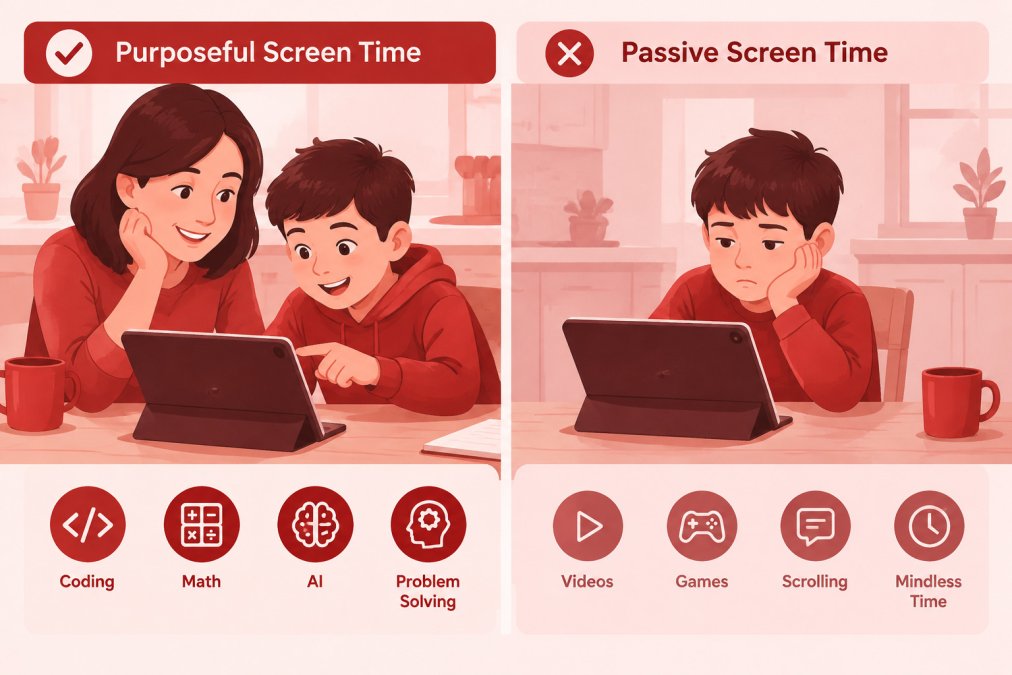
Run the active-vs-passive check. Sit beside your child for one session and count decisions. A decision is any moment where your child has to choose what to do next, pick a step, predict an outcome, fix a mistake, or explain a choice. A program with many decisions per minute is active. A program where your child mostly taps "next" or watches an animation is passive, even if it's labeled educational.
Look for natural stopping points. Good programs end a lesson at a clear finish line rather than pulling kids into an endless loop. That matters for screen-time limits because a session with a defined end is easier to schedule and easier to stop. If a program is built to keep kids scrolling, you'll be the one enforcing the stop, and that's a harder job than it needs to be.
Check how the program handles frustration. This is the make-or-break for a child who gives up when things get hard. Look for hints that appear after a wrong answer, smaller steps when a task is too big, and the ability to retry without penalty. A program that only says "incorrect" and moves on teaches kids to quit; one that offers a nudge teaches them to keep trying.
Decide what "enough" looks like for your family before you start. There's no single right number, and guidance varies by age and family. A practical approach is to set a short, consistent session, many families find ten to twenty minutes a few times a week works well for younger kids, and to treat that time as active learning rather than entertainment.
Make progress visible without hovering. You shouldn't have to sit over your child's shoulder to know whether the time is well spent. Look for a parent view or progress report that shows what your child worked on. That report is also your best tool for the next session: if you can see that your child struggled with loops last week, you can point them to a related activity this week.
Watch out: a program that's highly engaging can still be mostly passive, and a program that feels calm can be deeply active. Judge by what your child is doing, not by how excited they look.
A short first week tells you a lot. Try one ten-minute session, watch where your child gets stuck, and ask them afterward to explain one thing they figured out. If they can, the screen time is doing its job.
A Practical STEM Curriculum Evaluation Checklist
Use this list when you review any program. A "yes" to most items suggests a good fit.
- The age range matches my child
- Lessons adapt to my child's level
- No prior coding experience is needed to start
- Lessons ask my child to reason, predict and fix mistakes
- The provider shows how progress is measured
- I've tried a free sample or trial lesson
- The screen time involves active problem-solving
- Pricing and plan details are clear on the official site
- The program runs on the devices I already own
- I can see my child's progress without constant supervision
How to Evaluate a Curriculum Before You Commit
Before you pay, do a short trial run with your child. Sit with them for the first session. Watch where they get stuck, whether they stay engaged and whether they can explain what they did afterward.
Then ask three questions. Did my child learn something new? Did they keep trying when a task got hard? Do they want to come back? If the answers are yes, the program is probably worth it. If the answer to the first is no, keep looking.
It also helps to see how the program fits into your week. A plan that works for ten minutes a day may not suit a busy schedule, and a program that needs constant adult help may not suit a child who works alone.
Start Your Child's First Week with CodeAlgo Academy
If you're ready to try a game-based approach, CodeAlgo Academy is a good place to start. The platform covers coding, math and AI literacy for kids ages 5-14, with adaptive learning paths that work on web, iOS and Android. No coding experience is needed to get started. You can explore parent plans at codealgoacademy.com/pricing.
For a low-pressure first step, try one short lesson together this week and see how your child responds. That single session will tell you more than any checklist.
Frequently Asked Questions
What are the four C's of STEM education?
The four C's of STEM education are commonly listed as critical thinking, creativity, collaboration and communication. When you evaluate a STEM curriculum, check whether the program gives your child room to practice all four, not only recall facts. A strong program asks your child to explain their reasoning, try more than one approach to a problem, and share what they found. Lessons that only reward the right answer tend to miss the first two C's entirely.
How do you know if a STEM curriculum is effective?
Look for evidence of real learning growth, not just engagement. Good programs show progress on skills over time, such as solving harder problems with fewer hints, and they can explain which standards like CSTA and Common Core their lessons cover. Ask the provider what measures they use and how you can see your child's progress. If a program can only show that kids enjoy it, it has not yet shown that kids are learning.
How can I evaluate a coding curriculum for my child?
Start with age fit and level, then check whether your child needs prior coding knowledge or can begin on their own. Next, look at whether lessons make your child slow down to break a problem into steps, or whether they reward quick clicking. Finally, check which devices the program runs on and whether the screen time involves active problem-solving. A short trial week at home will tell you more than any brochure.