 how-to
7 Simple Ways to Introduce AI to Kids in the Classroom
Last Updated: November 11, 2026
Quick Summary
To introduce AI to kids, start with what they already know: ask who has used a smart speaker or seen a video suggestion, then name it as AI. Explain it in one sentence, AI is a computer that has looked at lots of examples and learned to guess what comes next, and follow with unplugged sorting games before any screen time.
- 86% of children ages 9 to 17 had used AI in some form by 2026, per Common Sense Media.
- Keep K-2 lessons to about 10 minutes and skip coding; the goal is recognition and curiosity.
- The train-the-teacher game teaches how training data shapes output, mistakes included.
- A 40-minute first session needs only paper, markers and a whiteboard.
- Teach three safety habits: protect your data, check the answer, and ask who gets hurt.
Table of Contents
- Start With What Kids Already Know About AI
- How to Explain AI to a Child in Plain Language
- Match the Lesson to the Age Group
- AI for Kids Activities That Need No Special Equipment
- A Complete First-Session Plan for a 40-Minute Class
- AI Safety for Kids: Privacy, Accuracy and Fairness
- Free AI Courses for Kids to Try Before You Commit
- How to Introduce AI to Kids Across a Whole Term
- Get Started with CodeAlgo Academy
- Frequently Asked Questions
Start With What Kids Already Know About AI
You do not have to introduce AI to kids as something strange and new. Most of them have already met it.
So start by asking, not telling:
- "Who has asked a smart speaker a question?"
- "Has a video app ever suggested something you liked?"
- "Did anyone use a chatbot for homework this year?"
Then name it. "All of those are AI." You just taught the first lesson in under two minutes.
Watch out: the biggest mistake here is opening with a definition. Kids tune out when adults lead with vocabulary. Lead with their experience, then attach the words.
How to Explain AI to a Child in Plain Language
Artificial intelligence is a computer program that learns patterns from examples so it can make predictions or choices.
Here is the sentence we use with K-8 students: "AI is a computer that has looked at lots of examples and learned to guess what comes next."
Then add the honest part. AI does not "know" things the way a person does. It spots patterns in data, and sometimes it gets them wrong.
Three Kid-Friendly Analogies That Actually Work
Pick the analogy that matches your grade level:
- The pizza guessing game. You notice every time your friend has pizza, he also has soda. So next time you see pizza, you guess soda is coming. AI does the same thing with data, and it can guess wrong.
- The puppy learning "sit." You show the puppy the same command many times. It learns from repetition, not from reading a manual. Training data works the same way.
- The playlist. A music app watches what you skip and what you replay. Then it builds a list it thinks you will like. That is a recommendation system, and it is AI at work.
For a deeper walkthrough of these ideas, see our guide on teaching AI literacy in K-8 schools.
Match the Lesson to the Age Group
The same topic needs a different entry point at every grade. The useful question is not "what grade" but "what can this child already do", read a sentence, hold attention for ten minutes, follow a two-step rule. Plan around those, and the grade band becomes a starting guess rather than a rule.
Here is how we would plan it, with the developmental reason behind each choice:
| Grade Band | Entry Point | Best Activity | Developmental Fit | What to Expect |
|---|---|---|---|---|
| K-2 | AI as a helper | Sorting picture cards into "AI" and "not AI" | Recognition and sorting; no reading required if cards are images | Short attention spans, keep it to 10 minutes; kids name tools they use at home |
| 3-5 | AI as a pattern finder | Teach a partner a rule, then test it | Two-step rules and simple cause-and-effect reasoning | Kids start spotting unfair or incomplete rules |
| 6-8 | AI as a system | Build a simple classifier in a block-based tool | Abstract reasoning and multi-step planning | Real debates about bias, accuracy, and who is responsible |
K-2: Recognition Before Vocabulary
At this age, the goal is that a child can point at something and say "that's AI" or "that isn't." Keep sentences under ten words, use pictures instead of text, and stop while they are still interested. A ten-minute sort with twenty picture cards is plenty. Skip "algorithm"; "steps" and "rules" do the same job.
Grades 3-5: Rules, Patterns, and Fairness
By upper elementary, most children can hold a two-step rule in mind and test it. That is the window for the "train the teacher" activity, where students give you examples of a good line versus a messy line and you follow their rule exactly, mistakes included. This is also when fairness questions land: ask who is missing from a set of examples and why that might matter.
Grades 6-8: Systems and Consequences
Middle schoolers can reason about a system rather than a single example. They can discuss training data, what a model optimizes for, and who bears the cost when it fails. Block-based classifiers work well here because students see inputs and outputs change as they adjust the data. Expect sharper questions, "who decided what counts as correct?", and let them sit rather than rushing to an answer.
Adapting for Different Learners and Access
Not every classroom has a device for every child, and not every child reads at grade level. A few adaptations keep the lesson open to everyone:
- No devices? Run the card sort and the train-the-teacher game entirely unplugged. Both teach the core idea without a screen.
- Mixed reading levels? Use images and spoken instructions; pair readers with non-readers.
- Attention and sensory needs? Shorten each segment, give one instruction at a time, and offer a quiet corner for the reflection step.
Watch out: the most common mistake is rushing younger grades into coding. In K-2, the goal is recognition and curiosity, not syntax. Save the building for grades 3 and up, and let the older grades carry the harder conversations.
AI for Kids Activities That Need No Special Equipment
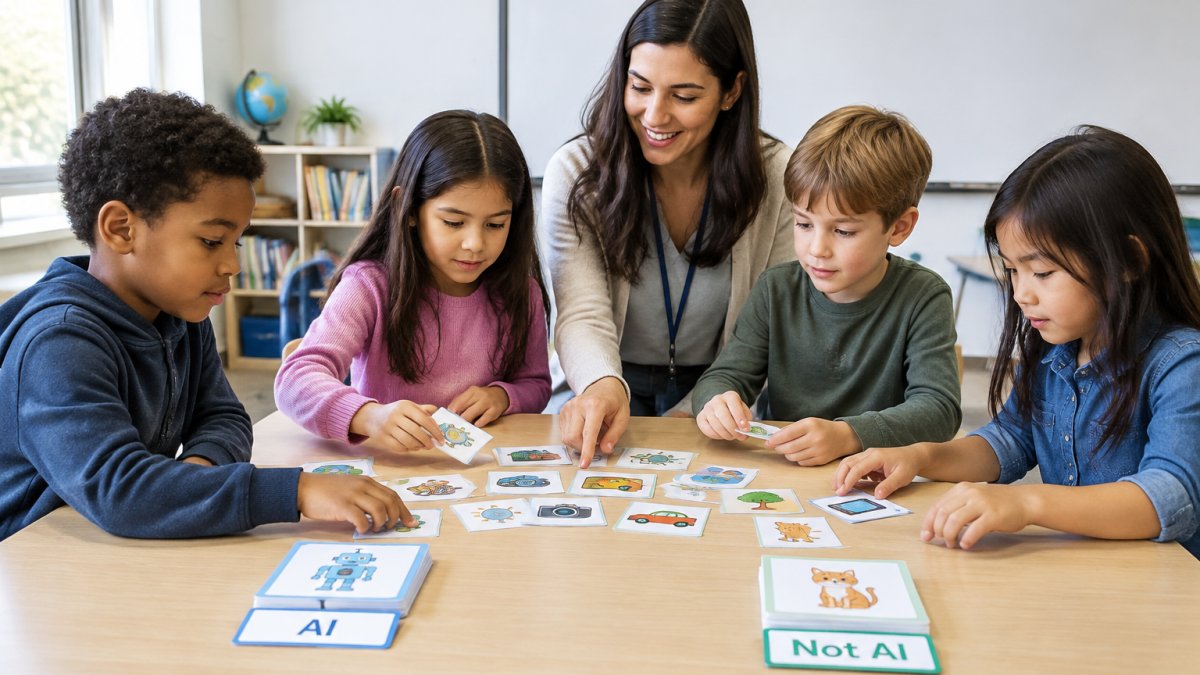
Many useful AI for kids activities run on paper, index cards, and conversation. No laptops or accounts are needed, which helps teachers who want to test the topic before committing to any platform.
Try these four:
- AI or not AI? Print 20 pictures. Kids sort them into two piles and defend their choices.
- Train the teacher. Students give you examples of "good line" vs "messy line." You follow their rule exactly, mistakes included. They learn how training data shapes output.
- Prediction journal. For one week, students write down what they think an app will suggest next, then check.
If you want a shortlist of tools once you are ready for screens, our roundup of AI literacy tools for elementary students compares the options.
A Complete First-Session Plan for a 40-Minute Class
Here is a plan you can run tomorrow, even if you have never taught computing before. Total time is 40 minutes.
What you need: paper, markers, and one whiteboard.
- Hook (5 min). Ask the smart speaker question above. List answers on the board.
- Define (5 min). Say the one-sentence definition. Have students repeat it in their own words to a partner.
- Sort (10 min). Run the AI or not AI card sort in pairs.
- Explain (10 min). Each pair picks one card and explains their reasoning to the class.
- Reflect (10 min). Ask: "Where could AI get this wrong?" Collect answers on the board.
Expected result: every student can name one AI tool they use and one way it might fail. That is a real learning outcome, not just fun.
If you have never coded before, our guide on teaching coding without experience walks through the setup step by step.
AI Safety for Kids: Privacy, Accuracy and Fairness
AI safety for kids comes down to three habits: protect your data, check the answer, and ask who gets hurt. Teach them as classroom rules with a concrete routine for each.
Privacy: What Never Goes Into a Chatbot
The simplest rule for children is a short "never type" list they can memorize:
- Your full name, address, phone number, or school name.
- Photos of yourself, your family, or your classroom.
- Passwords, or anything a grown-up told you to keep private.
Explain why in one line: what is typed into a tool may be stored and reviewed by people the child will never meet. For adults choosing tools, review settings before creating class accounts, whether student data trains the model, how long it is kept, and whether an adult can delete it. Free consumer tools and school-oriented tools often have very different defaults.
Accuracy: A Repeatable Fact-Check Routine
AI can state a wrong fact with total confidence, so children need a process, not a warning. Teach this four-step check and practice it together:
- Ask for the source. "Where did you learn that?" A confident answer is not a source.
- Find it somewhere else. Look for the same claim in a second, independent place, a textbook, a trusted site, a librarian.
- Check the date. Old information can be correct but out of date.
- Decide: confirmed, unsure, or wrong. Have students label the claim out loud rather than just moving on.
A useful classroom game is "spot the fake": show a chatbot answer with one planted error and have pairs hunt for it. The goal is not distrust, it is the habit of checking before repeating.
Fairness: Who Is Missing From the Examples?
If a training set shows mostly one kind of face, one kind of name, or one kind of neighborhood, the model may fail on everything else. The child-friendly question is simply "who is missing from these examples?" Run it on a set of pictures, a list of names, or a story the class wrote together. This is where students first meet the idea that data is a choice someone made, not a neutral fact.
A Short Adult Checklist Before You Turn Kids Loose
- Confirm what the tool collects and whether it trains on student input.
- Set accounts to the most restrictive privacy option available.
- Decide in advance what students may and may not type.
According to UNICEF Innocenti's 2026 brief on children and AI, about one in ten children report turning to AI tools for advice on personal matters. That makes the privacy conversation urgent, not optional, and it is why the "never type" list belongs on the wall, not just in a lesson plan.
Free AI Courses for Kids to Try Before You Commit
Trying free resources is a sensible first step before your school buys anything.
Start with these:
- Code.org's CodeAI activities, where students make predictions with machine learning models (Code.org's Teach and Learn AI resources).
- Scratch, free from MIT, for block-based projects that build sequencing and logic.
- Unplugged lessons from your own card sorts and prediction journals.
One caution: free tools vary in what they collect and how they store student work. Check each vendor's privacy terms before you create class accounts.
CodeAlgo Academy is another option to evaluate. Teachers need no coding background to use the platform, and it runs on web, iOS, and Android.
How to Introduce AI to Kids Across a Whole Term
A single lesson sparks curiosity. A term builds skill. The trick is to sequence it so each week adds one idea and reuses the last.
Here is a six-week arc we would use:
- Week 1: What AI is, and where kids already meet it.
- Week 2: Patterns and predictions, using the pizza and playlist analogies.
- Week 3: Training data. What goes in shapes what comes out.
- Week 4: Accuracy and fact-checking. The two-source rule.
- Week 5: Fairness and bias. Who is missing from the examples?
- Week 6: Build something small, then present it.
Plan for roughly half an hour each week, plus a short reflection. Keep a class chart of new vocabulary and add one word per week.
For lesson plans, assessment tools, and progress reports to support the unit, browse our STEM resources for your classroom.
Get Started with CodeAlgo Academy
The hardest part of how to introduce AI to kids is not the technology. It is finding time to plan, test, and prove it worked.
Our game-based K-8 curriculum is aligned to standards such as CCSS and CSTA. Teachers need no coding background, and students can learn on web, iOS, and Android. Schools using the platform have solved 41,928+ coding problems across 10 states.
You can start small, without a district-wide budget or a dedicated IT team. When you are ready, create your CodeAlgo Academy account and choose whether you are joining as a parent, teacher, or student.
The challenge is simple: your students are already using AI, whether or not your classroom has caught up.
Frequently Asked Questions
At what age should kids learn about AI?
Children can start learning what AI is around age five, using concrete examples like voice assistants and video recommendations. The depth changes with age: K-2 students learn to spot AI in daily life, grades 3-5 explore patterns and predictions, and middle schoolers can discuss training data, bias and responsible use. Most students meet the technology before anyone explains it to them.
How do you explain AI to a 5-year-old?
Keep it to one idea: AI is a computer program that learns from examples. Try a sorting game where the child groups animal pictures by feature, then explain that a computer does something similar with thousands of examples. Avoid words like algorithm or neural network at this age. The goal is a feeling of familiarity, not a definition your students can recite.
What are simple AI activities for kids with no technology?
Try a human sorting machine: students classify picture cards into AI and not-AI piles and explain their reasoning. A pattern-prediction game works well too, where you show a sequence and ask students to guess the next item, then discuss why a computer needs many examples to guess correctly. These activities build the vocabulary students need before they touch a screen.
How can teachers teach AI in the classroom without a coding background?
Start with discussion and unplugged activities, which need no technical knowledge. When you move to screens, choose a platform with pre-built lessons and teacher guides so you facilitate rather than code. CodeAlgo Academy is built for this: it requires no coding background from teachers, aligns to CCSS and CSTA standards, and runs on web, iOS and Android. Schools using it have solved 41,928+ coding problems across 10 states.